A vape screen in an empty dry-herb vaporizer is a small mesh or perforated part in the air path. One model may have a screen at the chamber and a different one in the removable mouthpiece. To identify a loose spare, start with the opening named in the model’s parts diagram. Mesh appearance and diameter help describe the piece, but its location and the way the edge is supported tell you which diagram to check.
🔍 1. Start With the Screen’s Location
“Screen” can also mean the electronic display. In a parts diagram, check which assembly the term appears under. A mesh disc may sit under a chamber heading, in a mouthpiece assembly, or near a cooling component. A display belongs to the controls or housing. Separating those meanings at the search stage keeps the result about the part on the workbench.
🔥 2. The Oven Screen: Where It Sits and What It Looks Like
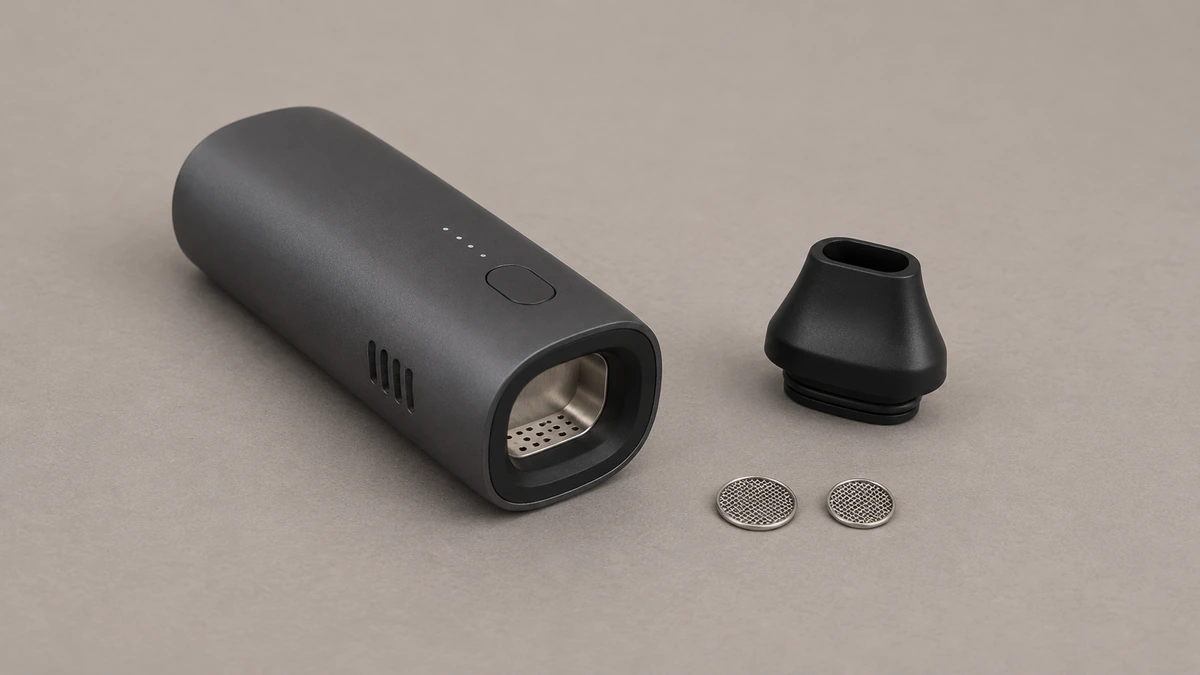
A manufacturer may label a mesh part in the oven as a chamber screen. Locate the chamber wall and the opening shown in the diagram, then read where the screen sits relative to them. Designs differ, so leave the heater position and screen shape to the model documentation.
The dry-herb atomizer guide shows where screens fit into the broader heater and chamber discussion. A diagram may show a flat disc supported by a ledge, or a shallow basket that has an edge of its own. A ledge is part of the seat. A rim or lip may belong to the loose component. Keep those two details separate when comparing an empty chamber to a spare-parts photo.
Woven mesh and perforated sheet look different in a close photo. A woven grid shows crossing strands. A perforated piece shows openings cut or formed through a continuous surface. This distinction describes the part in front of you and helps you find a corresponding image in the manual.
🕸️ 2.1 Coarse Mesh Appearance Is Not a Fit Guarantee
Two oven screens can look equally coarse in a product photo and still differ in outer diameter, rim depth, or the angle of the cup, any one of which can keep a part from seating flush.
💨 3. The Mouthpiece Filter: A Separate Seat, A Separate Shape
A mouthpiece filter belongs to the outlet assembly. It may sit in the removable tip or behind it in a carrier. The distinction matters because the model documentation may show the tip, carrier and screen together as one service part.
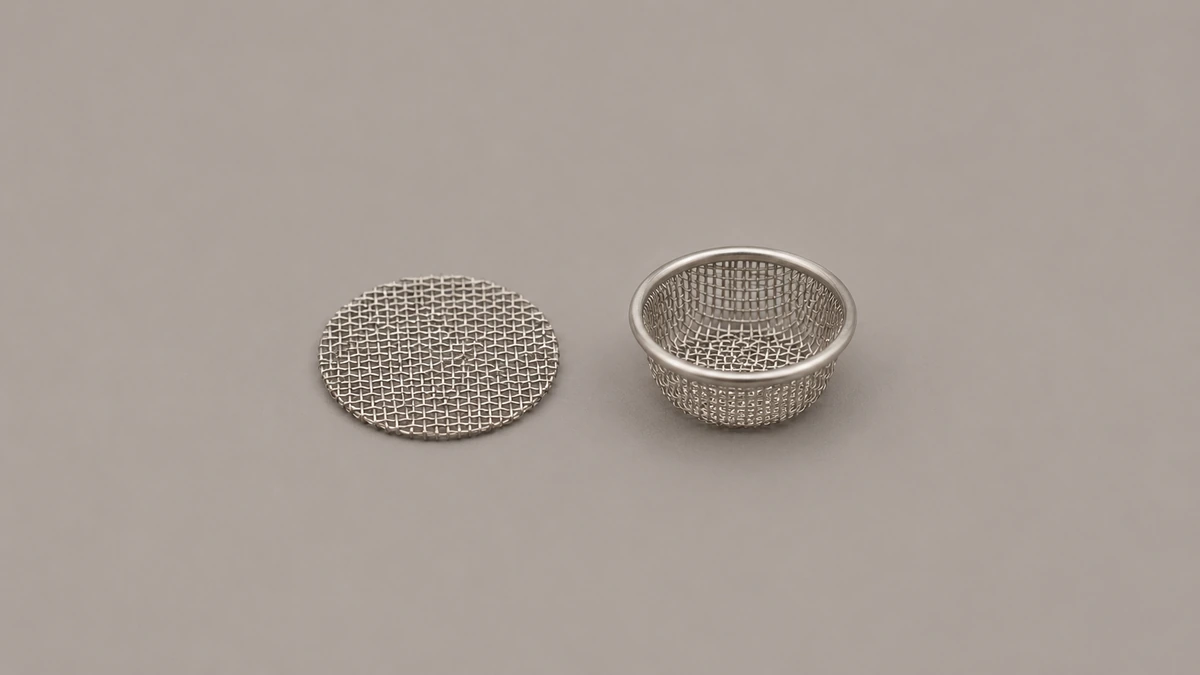
A flat disc beside a mouthpiece gives a useful reference for scale. It does not tell you which way the mouthpiece faces in an assembly drawing, whether the disc is part of it, or which edge the seat supports.
It may sit in a dedicated groove inside a removable mouthpiece tip, held by friction or a small retaining lip, rather than resting against a heating element.
📐 4. Flat Versus Cupped: Reading the Silhouette Correctly
Use shape to describe a loose part after you identify where the screen is supposed to sit. Photograph the face and the side. From above, a shallow basket and a flat disc can both appear circular. From the side, the basket’s depth and its lip become visible.
A flat disc can sit in a holder above a heater or inside a mouthpiece. Without a model number or a labeled drawing, the same flat silhouette is consistent with either location.
A basket shape gives you another clue to compare with the drawing. Check whether the drawing shows an integral rim or a separate ring. The two can look similar once assembled.
Diameter, rim shape, the presence or absence of a carrier ring, and the part’s resting position inside the device are four independent clues, and all four should agree before assuming a part fits a given seat.
A part that matches on diameter alone, while differing in rim shape or carrier design, is not confirmed to fit just because the overall silhouette looks similar in a photo.
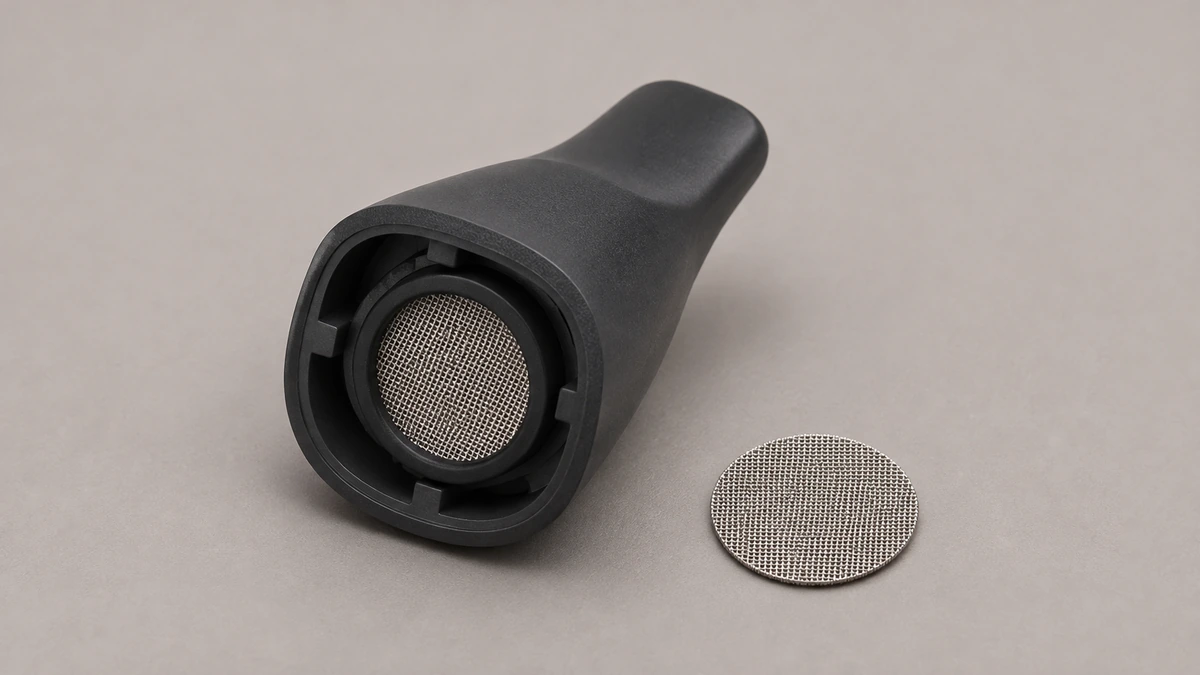
🗂️ 5. Baskets, Carriers, and Cooling Units: When a Seat Changes the Part’s Name
A parts diagram may show more than two pieces that look like screens. One can belong to a holder above the heater, while another is named as part of a cooling unit. Some designs also list a separate basket screen.
A basket screen and a carrier for a flat screen deserve different labels in your notes. The basket itself is a shaped mesh part. A carrier supports a separate piece of mesh. Use the manufacturer’s terms for the model instead of assuming every basket or ring is built the same way.
A cooling unit can have its own named screen. If the manufacturer lists the cooling assembly and the spare screen separately, record both names. That helps clarify whether a support question is about the mesh itself or the housing that holds it.
Each of these seats can hold visually similar flat mesh, which is exactly why position within the device, not appearance, is the clue that determines which replacement part a given seat needs.
📖 5.1 Tinymight’s Three-Part Vocabulary
Tinymight’s own vaporizer glossary, published at tinymightvape.com/vaporizer-glossary, is a useful first-party example of this distinction, because it separately defines a basket screen, a flat mesh screen that sits in a holder above the heater, and a screen located inside the cooling unit as three distinct parts rather than one generic vape screen.
That vocabulary describes Tinymight’s own product family and should not be assumed to apply to other brands or chamber designs, since a different manufacturer may use only two seats, or may name a carrier differently even when the underlying mesh looks similar.
Some parts lists also include an adapter farther along the air path. AOVAPE’s adapter and air path guide explains where a water-pipe adapter sits relative to the vaporizer chamber.
| Where it appears | What to compare in the drawing | What to record for support |
|---|---|---|
| Oven or chamber | Where the screen is shown relative to the chamber wall or a separate basket | The model and the full chamber-part label |
| Mouthpiece | Whether a removable tip, a ring and the screen appear as separate pieces | The shape of the mouthpiece and which side exposes the screen |
| Holder above the heater | Whether the parts drawing identifies the holder and its mesh separately | The separate part names, if the manual provides them |
| Cooling assembly | Whether the mesh appears in a separate cooling-unit diagram | The exact assembly or revision named in that diagram |
🧪 6. Two Examples From a Workbench
The goal in each case is to describe the part accurately enough to ask a manufacturer or retailer a specific question, rather than to guess and install.
📦 6.1 Example One: An Unlabeled Screen Found Loose in a Drawer
Suppose an adult finds a single small flat mesh disk loose in a drawer, with no original packaging and no indication of which device it came from.
Compare the disc visually with the labeled parts in the manual. Does the drawing show a flat piece by the mouthpiece, a basket at the chamber, or flat parts in more than one location? If it shows two visually similar parts, the drawing label matters more than the outline. Keep the loose screen out of both openings until the maker can identify it.
Photograph the loose screen beside a ruler on a tabletop, keeping the rim in view. Make a separate photo of the device label. If the screen has no known model, say where it was found and keep its origin as an open question. Similar-looking mesh from another device can end up in the same drawer.
🪙 6.2 Example Two: A Visible Metal Disk Inside a Borrowed, Powered-Off Device
On a second device, a circular perforated surface is visible deep inside the empty oven. The owner’s manual shows a removable mouthpiece and calls out a spare mesh above that assembly, but it does not label the oven surface as a spare.
That manual identifies one replaceable mesh part. It leaves the oven surface unidentified. The owner can send a photo of the chamber along with the model number, and ask whether the visible surface is separately serviceable.
Check that specific model’s manual or manufacturer documentation for a parts diagram before deciding whether the component is removable, since prying at a part that was never designed to be removable risks damaging a fixed component rather than freeing a loose one.
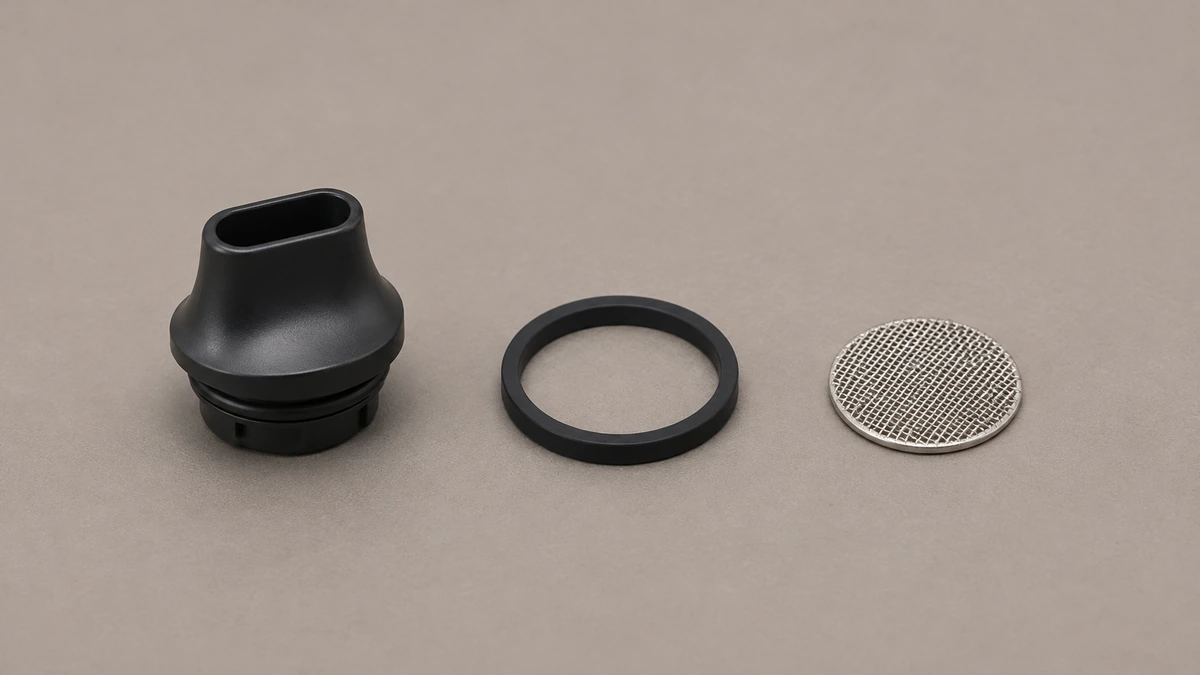
💬 7. What Owner Questions Reveal About Screen Confusion
The same search question can begin with different things on the table: a newly opened kit, an unmarked pack of spares, or a used device with a visible mesh disc.
In one case, an owner located a smaller mouthpiece screen inside a device but could not find or identify a separate oven screen, and the replies that followed disagreed about which screen, if any, had shipped already installed in the chamber.
In another, an owner assumed that a single coarse multipack of screens would cover both the chamber and the mouthpiece, and the resulting replies suggested several conflicting substitutions rather than a confirmed answer.
In a third, an owner holding a specific screen in hand still could not confidently say where it belonged, and commenters differed on both placement and mesh type.
None of these exchanges should be read as a confirmed fit for any screen; they show only that uncertainty about screen location and naming is easy to run into when a post does not name a model or location, which is the gap this article is written to close.
🧵 7.1 Why the Disagreement Happens
The device, screen location and spare pack are separate details. An answer about a loose mouthpiece screen might be accurate for that model but irrelevant to the chamber screen in someone else’s photograph.
A packet marked “coarse” identifies a mesh option within a product line. Copy the full product name and any model or revision listed beside it before trying to compare it with a drawing.
If a listing gives a diameter but omits a side view, you can describe the size while leaving the rim and shape unanswered. A plain overhead image may conceal both details.
When a drawing names two kinds of screen separately, keep two entries in your notes. Adding the exact labels to your question makes clear whether you are comparing two different components or two descriptions of the same one.
The next question can be as narrow as “Which part number in this diagram covers the mesh behind this mouthpiece?” That identifies both a location and the information you are missing.
🔧 8. Recognize a Fixed Grid or Cover
Not every small metal disk inside a dry-herb device is a screen in the replaceable-part sense, even when it visually resembles one.
Some devices include a fixed grid or cover that is manufactured as part of the heating element assembly and is never intended to be removed by the owner at all, while others place a true removable screen only a short distance away from that fixed feature, making the two easy to confuse by sight alone.
Mesh and perforated metal parts can look functionally similar in a photo regardless of whether they are meant to trap material, support a heating coil, or simply cover a stationary vent, so appearance alone does not establish that a given disk is a user-serviceable screen.
From a photo, record what is visible: a perforated face, a seam or a separate ring. The device documentation is needed to establish the part’s purpose and whether the maker lists it for replacement.
📋 8.1 Fixed Disks and the Manual Check
Start with the parts diagram. Look for a line pointing to the visible surface, a part name in the legend, and a manufacturer procedure that specifically names that part. Without a match, leave the surface in place.
Visible residue or discoloration around a part is also not evidence of a hardware problem by itself, and separating ordinary visible debris from an actual hardware fault is a judgment call specific enough that AOVAPE’s dry-herb burning hardware fault guide addresses it on its own rather than folding it into screen identification.
📝 9. Give Support One Part to Identify
Suppose a used device came with a spare pack and a manual for a related model. The manual calls one component a chamber screen, while the small packet says only “mesh.” A useful record starts with the device label. Add the name printed on the manual and the spare pack. If those names differ, record the difference before comparing parts. The pack can look original and still belong to a different revision.
📷 9.1 Photograph the Seat and the Spare Separately
Show the area around the visible mesh in a wide photo so the maker can see whether it is near the chamber, a removable mouthpiece, or a cooling assembly. In a second photo, show the loose part beside a scale without resting it inside the device. Take a side view if it has a shallow lip. A picture of the screen already inside an unverified opening could make the request harder to interpret, since the photo would obscure the edge that needs to be identified.
🏷️ 9.2 Keep Model and Part Numbers Distinct
The number on the housing identifies the device or variant. The number next to an arrow in the diagram may identify the component, its carrier, or the full assembly. Copy both with their labels. If the support reply names an assembly and you were asking about the screen alone, ask whether the mesh is available as a separate part. Keep the answer with the model record so the next loose screen does not start the same search again.